Soccer Shoot Star Arcade Game
Reviews
💡Soccer Shoot Star Online Game delivers a polished arcade soccer experience. The responsive physics and simple controls make each match feel fair and exciting. Customization options add variety, while the timer-based format keeps games short and intense. It is easy to learn but offers enough depth for repeated play, making it a solid choice for casual gaming sessions.
Description
Game Introduction
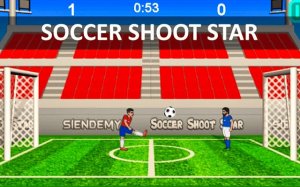
Soccer Shoot Star Online Arcade Game brings the excitement of a one-on-one football match to your browser with charming 2D graphics and responsive physics. Designed for instant fun and friendly competition, this game challenges you to become a football legend through skillful control and precise shooting. Before each match, you can fully customize your experience by selecting your preferred football player, playing field, and ball design. The core objective is simple: score more goals than your opponent before the timer ends. Every second counts in these intense, action-packed matches that are easy to pick up but offer depth for those who want to master the game.
How to Play
To play Soccer Shoot Star Online Arcade Game, both players share a single keyboard. Player 1 uses the W key to jump, A to move left, D to move right, and S to kick the ball. Player 2 uses the I or Num. 8 key to jump, J or Num. 4 to move left, L or Num. 6 to move right, and K or Num. 5 to kick. Precision and timing are key to performing amazing shots and saving goals. Master these controls to dodge tackles, aim for the top corner of the net, and outmaneuver your opponent.
Game Features
Game features include head-to-head competition that tests your reflexes and strategy. You can customize players, fields, and balls to make each match feel unique. Simple intuitive controls let you focus on the action. Fast-paced matches keep the energy high and encourage repeat play.
Tips for Success
To succeed in Soccer Shoot Star Online Arcade Game, focus on timing your kicks and jumps to outplay your opponent. Practice moving quickly to intercept the ball and position yourself for powerful shots. Aim for the corners of the goal to make it harder for the opponent to save. Stay aware of the timer and adjust your strategy—if you are behind, take more risks; if ahead, play defensively. Regular practice will help you master the controls and anticipate your opponent's moves.
Compatibility
💻 Desktop | 📱 Mobile | 📟 Tablet – All supported · Best with Chrome or Safari