Kids Word Builder Puzzle
Reviews
💡World of Alice - Make Words offers a calm, focused approach to early literacy. Each level presents a picture and three letters, guiding children to form the correct word. The lack of timers or scores reduces pressure, allowing kids to learn at their own pace. Replayability comes from the satisfaction of mastering words, and the device compatibility means practice can happen anywhere. It is a solid choice for parents seeking a safe, educational screen activity.
Description
Game Introduction
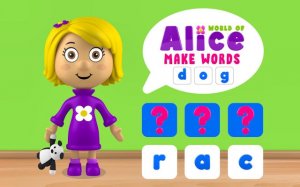
World of Alice - Make Words: Kids Word Builder Online Word Game is an educational puzzle game designed for young children. It focuses on building foundational vocabulary and phonics skills by guiding players to form simple three-letter words. Set in a vibrant and friendly world, the game turns early literacy into an engaging adventure. Its core objective is to help children recognize letters and their sounds through visual clues, making it an ideal tool for preschoolers and kindergarteners beginning their reading journey.
How to Play
Players typically start by looking at a picture clue displayed on the screen, along with a set of scattered letters. The goal is to drag and drop each letter into the correct order to spell the word that matches the picture. For example, a picture of a cat prompts the player to arrange the letters C, A, and T. The game provides immediate positive feedback for correct answers, reinforcing letter-sound connections without high-pressure scoring. No prior reading ability is required, as the visual cues guide the player. Levels progress gradually, allowing children to master basic words before moving on to new challenges, and any level can be replayed for extra practice.
Game Features
This game features intuitive drag-and-drop gameplay that is easy for young children to learn. It emphasizes foundational vocabulary and phonics through simple word formation. The learning environment is playful and encouraging, with supportive feedback that builds confidence. The game is compatible with smartphones, tablets, and computers, ensuring consistent learning experiences across devices. It is designed to be child-safe and ad-free, providing a secure digital space for independent exploration and play.
Tips for Success
Encourage children to say the word aloud as they arrange the letters, reinforcing the connection between sounds and spelling. Replay levels frequently to build familiarity and confidence with common words. Use the visual clues as a starting point for discussion, asking the child what they see in the picture before attempting the word. Consistent short practice sessions, such as a few minutes daily, can help solidify learning without causing frustration. Celebrate each correct word to maintain a positive and motivating atmosphere.
Compatibility
💻 Desktop | 📱 Mobile | 📟 Tablet – All supported · Best with Chrome or Safari